
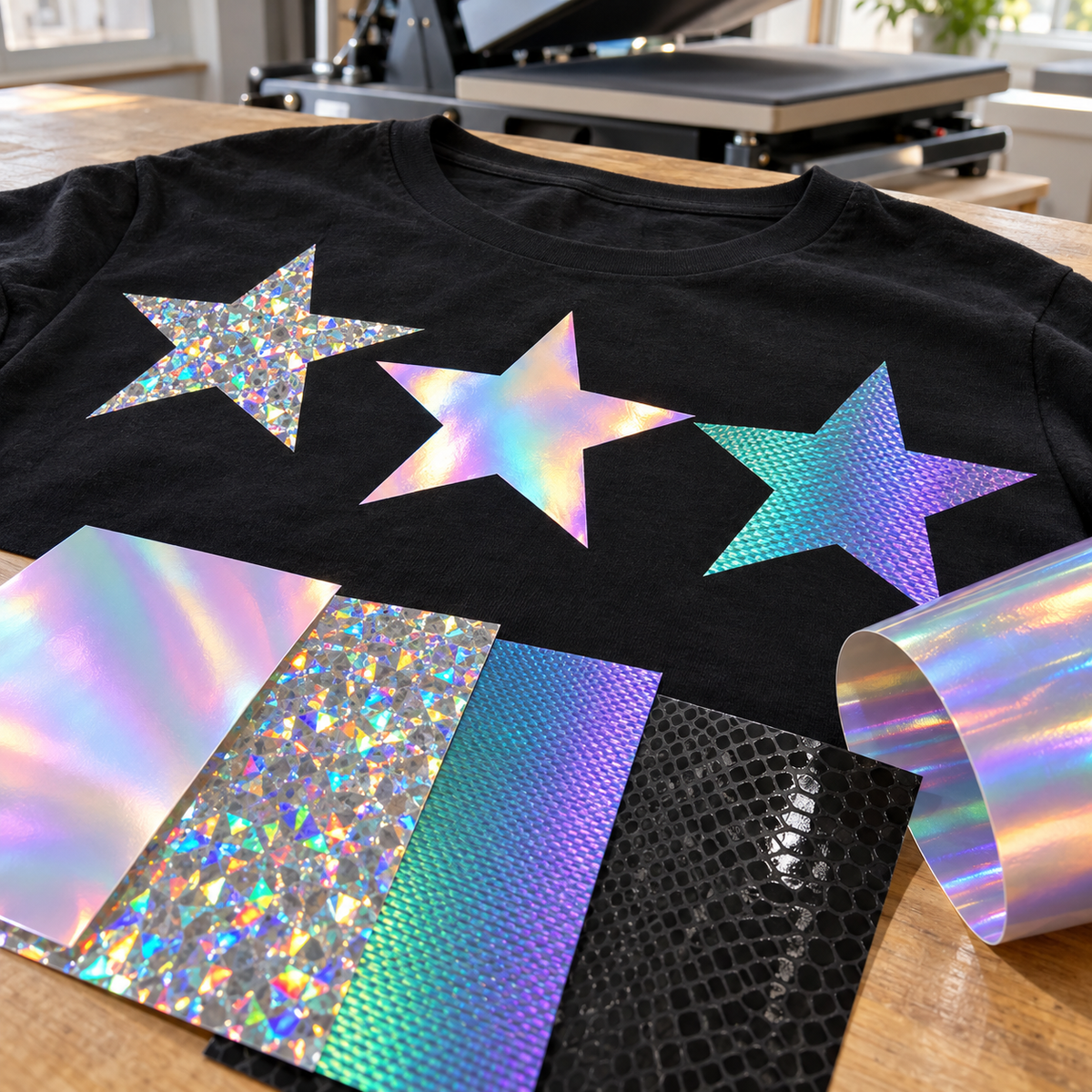
Holographic HTV is one of the fastest ways to make a simple design look expensive, but the category has grown crowded. Holographic, Pearl, Aurora, Eclipse, and hologram films all shift color as the light moves, yet they press, layer, and wear differently. This guide breaks down each color shifting HTV so you can pick the right iridescent heat transfer vinyl before you cut.
What Makes Color-Shifting HTV Different
Standard heat transfer vinyl is a single flat color. Color-shifting films add a reflective or diffractive layer that splits light into a spectrum, so the design changes hue as the wearer moves or the viewing angle changes. Depending on the film, that effect can look like sparkling chips, a smooth pearlescent sheen, a woven texture, or a pattern printed over a matte base.
Because the effect lives in the top layer, these films behave a little differently from your everyday vinyl. Some are thicker, some will not stretch, and some cannot accept another layer on top. Knowing those limits up front saves wasted material.
The Main Types of Holographic and Iridescent HTV
Siser Holographic HTV
Siser Holographic heat transfer vinyl uses color-changing chips that give designs depth and dimension. Under light, the chips flash different colors, which is why many decorators use it to mimic a rhinestone look without setting a single stone. It is CPSIA certified, so it is a common pick for kids' apparel, dance team shirts, and spirit wear.
Siser Holographic Pearl
Holographic Pearl HTV trades sparkle for a smooth, chrome-like iridescent surface. Think soap-bubble sheen rather than glitter. It looks elegant on script fonts, monograms, and minimalist logos. The tradeoff: Pearl will not stretch and should not be layered, so keep it off very stretchy fabrics and use it as a single-layer design.
Siser Aurora
Siser Aurora HTV is a color-shifting film with a textured, woven look. At 190 microns it has more body than a typical thin HTV, and it uses an opaque adhesive, so the color holds on both light and dark garments. Aurora is also the most flexible member of the family when it comes to layering: Siser lists it as compatible with EasyWeed, Sparkle, and StripFlock Pro. The manufacturer's settings are 305°F for 15 seconds at medium pressure with a cold peel, and it is CPSIA certified.
If you print and cut, there is also a printable version, Siser ColorPrint Aurora, which lets you print full-color artwork onto an iridescent base with an eco-solvent or solvent printer.
Siser Holographic Eclipse
Holographic Eclipse HTV takes a different approach. Instead of an all-over rainbow, it pairs a matte base with high-gloss, all-black holographic patterns such as Greenery, Peace Love, and Snakeskin. The result is subtle in flat light and lively when the pattern catches the sun. It is a good fit for designs that need texture without a loud color shift.
Stahls' Hologram HTV
The Stahls' Hologram HTV collection is another option if you work within the Stahls' lineup. Press settings and fabric compatibility vary by product, so check the product page for the exact time, temperature, and peel before your first press.
Side-by-Side Comparison
| Film | Look | Layering | Notable details |
|---|---|---|---|
| Siser Holographic | Color-changing chips, sparkle and depth | Use as the top layer | Can mimic a rhinestone look; CPSIA certified |
| Holographic Pearl | Smooth, chrome-like iridescent sheen | Do not layer | Will not stretch; single-layer designs only |
| Aurora | Color shift with a woven texture | Can be layered with EasyWeed, Sparkle, StripFlock Pro | 190 microns; opaque adhesive; 305°F, 15 s, medium pressure, cold peel; CPSIA certified |
| Holographic Eclipse | Matte base with glossy black holographic patterns | Use as the top layer | Patterns include Greenery, Peace Love, Snakeskin |
| Stahls' Hologram | Holographic finish | Check product page | Follow Stahls' settings for each color |
Layering Rules for Color-Shifting Vinyl
Layering is where most holographic projects go wrong. The textured and reflective surfaces of these films do not give the next layer much to grip, and some films are not built to take heat twice. A few rules keep you out of trouble:
- Put holographic on top. As a general rule, use holographic and iridescent films as the top layer, with a standard HTV such as EasyWeed underneath.
- Never layer Pearl. Holographic Pearl should not be layered at all, either on top of or under another film.
- Aurora is the exception. Aurora can be layered with EasyWeed, Sparkle, and StripFlock Pro, which opens up two-tone and textured designs.
- Tack, then finish. Press each lower layer just long enough to stick, peel the carrier, then do the full press after the top layer is in place.
For a deeper walkthrough of registration and press timing, read our guide on how to layer heat transfer vinyl for multi-color designs.
How Garment Color Changes the Effect
Color-shifting vinyl reflects whatever light reaches it, so the garment underneath can change how the design reads.
- Dark garments (black, navy, charcoal) make most holographic effects pop. The contrast frames the color shift and makes sparkle look brighter.
- Light garments (white, ash, pastels) give a softer, more pastel impression. Pearl and Aurora can look delicate and refined here.
- Opacity matters. Aurora's opaque adhesive helps it hold its hue on light and dark fabrics. With other iridescent films, the shirt color can influence the final look, so do a test press on the actual garment color before running an order.
Design Tips That Make Holographic Vinyl Shine
- Go bold. Thick letters, chunky shapes, and solid silhouettes show off the most color shift. Hairline strokes lose the effect and are harder to weed.
- Fake the bling. Cut a pattern of small circles or a dotted outline from Siser Holographic for a rhinestone-style look that is lighter and faster to apply than stones.
- Use it as an accent. A holographic star, heart, or single word over a solid EasyWeed design draws the eye without overwhelming the shirt.
- Keep it simple on Pearl. Since Pearl is single-layer only, design in one color and let the sheen do the work.
- Run a test cut. Thicker films like Aurora may need a little more blade depth or force than standard HTV. Cut a small test shape first.
Pressing and Care Basics
Each film has its own settings, so always follow the time, temperature, pressure, and peel instructions on the product page. Use a cover sheet, preheat the garment for a few seconds to remove moisture, and make sure your press applies even pressure across the design.
After pressing, care is similar to other HTV. Wait at least 24 hours before the first wash, turn the garment inside out, wash cold on a gentle cycle, and tumble dry low or hang dry. Skip bleach and fabric softener, and never iron directly on the design. Reflective and iridescent surfaces can scuff, so washing inside out matters even more here. Our HTV aftercare guide covers the full routine.
Frequently Asked Questions
Can you layer holographic HTV?
Usually only as the top layer. Holographic Pearl should not be layered at all. Aurora is the most layer-friendly option and can be combined with EasyWeed, Sparkle, and StripFlock Pro.
Which color shifting HTV works best on dark shirts?
Aurora is a strong choice because its opaque adhesive holds the color on both light and dark garments. Siser Holographic also looks striking on black and navy, where the contrast makes the chips stand out.
Is holographic HTV good for stretchy fabrics?
It depends on the film. Holographic Pearl will not stretch, so avoid it on leggings and performance wear. For stretchy garments, check the product page for each film's fabric recommendations and test before production.
Is holographic vinyl safe for kids' clothing?
Siser Holographic and Aurora are CPSIA certified. Check the product page for each film you plan to use on children's items.
Find Your Favorite Finish
Color-shifting vinyl rewards a little planning: pick the effect you want, respect each film's layering limits, and test on the real garment. Browse the full lineup of holographic, Pearl, Aurora, and Eclipse HTV at Atlanta Vinyl and order a few colors to see which shimmer fits your next project.