Custom Glow In The Dark DTF Gang Sheet - UPLOAD A PRINT-READY FILE (Advanced Users)

SKU: GLOW-DTF-UP-22x12

Size: 22 in X 12 in
Processing Turnaround: 24 hour turnaround (excluding holidays)
Price:
Sale price$16.99 USD

Shipping calculated at checkout

Description

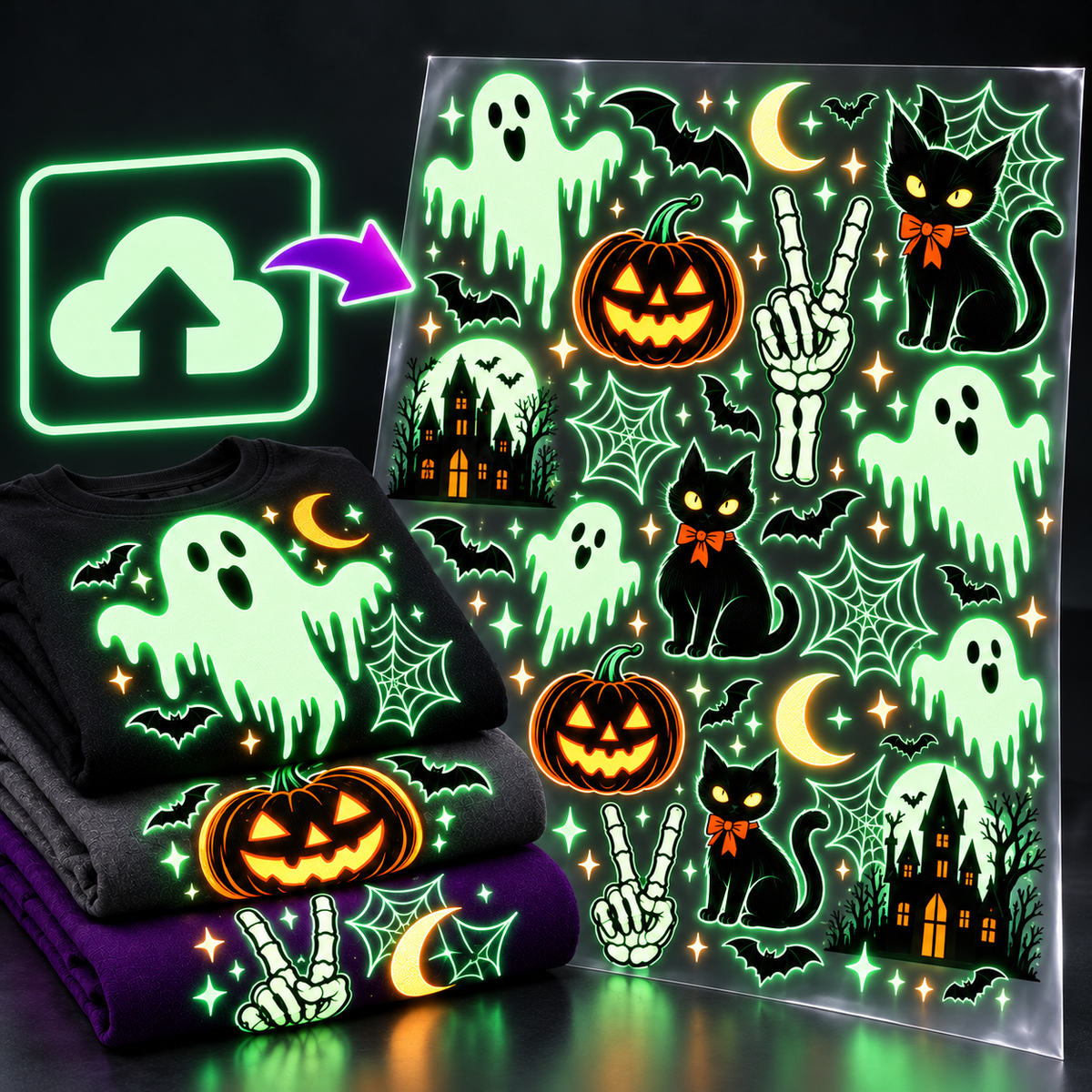
Upload your Print-Ready sheet for Custom Glow In The Dark DTF gang sheets, perfect for bulk orders and maximizing your prints with transfers that are ready to press on demand.


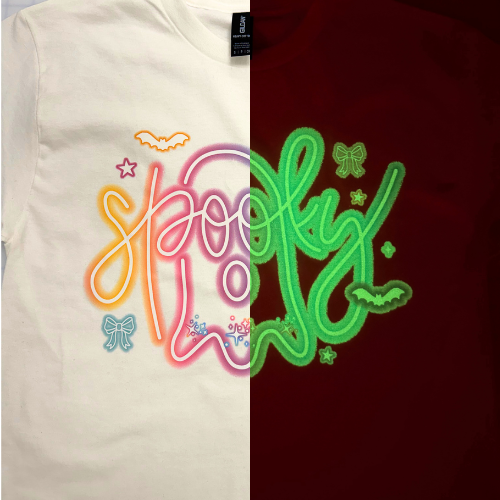
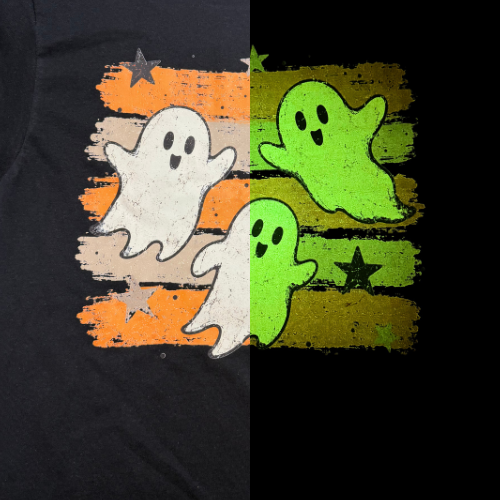
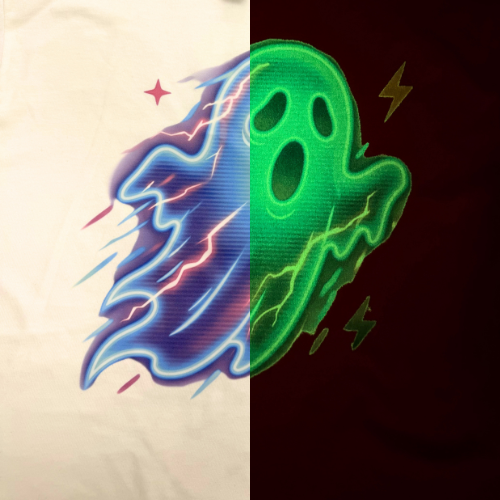
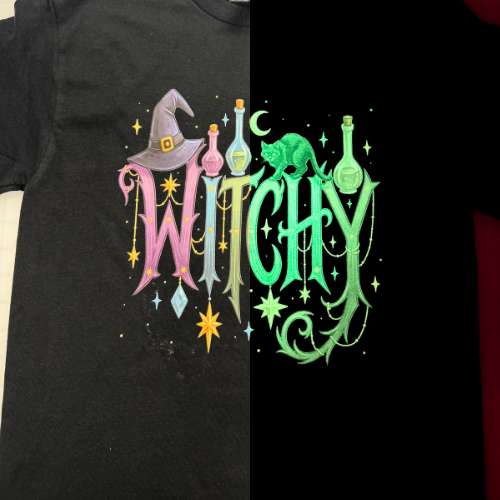
NOTE: Due to the Glow in the Dark effect on the film, colors displayed on each image uploaded will have a very slight fade. Dark colors will have a lesser glow effect than lighter colors. 

Bulk pricing — always on

Order 4 or more 22" × 240" gang sheets, pay $96 each

Not a sale. Not a code. This is our standing volume price on full 22" × 240" sheets — it applies automatically, every order, all year.

1–3 sheets
$106
per 22" × 240" sheet
4+ sheets (22" × 240")
$106$96
per sheet — save 9.4%
Cost per linear inch
$0.40
down from $0.44
You save
$40
on a 4-sheet order

How it applies: hit $424 in Custom DTF Transfers and the discount drops in at checkout automatically. Mix sizes, mix products — 22" × 240" sheets, smaller gang sheets, or By Size orders all count toward the threshold.

  • Description
  • File Requirements
  • Software Warnings
  • Application & FAQ

Already have a print-ready gang sheet? Upload it here. Sheets are 22 inches wide in lengths from 12 to 108 inches, printed full-color with white ink on high-quality transfer film. No minimums. No setup fees. No art fees. 24-hour turnaround on every order.

Is this the right product for you?

Use this page if you have already laid out and exported a finished, print-ready PNG at the exact sheet size you want — you work in Photoshop, Illustrator, Affinity, CorelDRAW or similar, and you want full control over placement and nesting. Check the File Requirements tab before you export.

Use the Online Gang Sheet Builder instead if you have individual design files and want them arranged for you. The builder nests your artwork automatically, shows you the sheet as you build it, and costs exactly the same per square inch. Most customers should use the builder — this page exists for people who would rather do the layout themselves.

How to order

Upload one file at a time. Choose your PNG, select the matching sheet size and quantity, then add to cart. Return to this page and repeat for each additional file. We do this deliberately — it keeps every file matched to the right size and quantity, and it is why upload orders rarely go wrong.

What DTF transfers apply to

Cotton, cotton/poly blends and 100% polyester in any color, plus tri-blends, fleece, canvas totes and most woven fabrics. Full-color artwork, photographs, gradients and fine detail all print at the same price — you pay for film area, not for the number of colors.

Nylon is not recommended. The adhesive needs fabric fibers to bind into, and nylon's surface is too smooth to hold reliably.

Press and go — all you need is a heat press. Full step-by-step instructions are on the Application & FAQ tab.

Turnaround

24-hour turnaround on every DTF order, excluding holidays. Your transfers are printed in-house by our own staff on a high-speed, large-format machine — we do not outsource.

The day you order is not day one. A full business day has to elapse. Our DTF department prints Monday through Friday and does not print weekends.

Rush printing

Need it sooner? Same-day rush printing is $50 on orders placed before 12 PM, completed by the end of that business day, first come first served.

The rush fee is billed separately from your sheet, and it covers printing only — expedited shipping is a separate service you choose at checkout. Add rush printing to your order.

Shipping

Free shipping on orders over $99, local pickup at our Smyrna storefront, and same-day local delivery within 50 miles.

Shipping and transit times you select at checkout begin once your order has shipped — expedited shipping is not expedited printing.

If your order includes other products alongside DTF transfers, everything ships together once printing is finished. If you need the other items sooner, place them as a separate order.

Full details on our shipping rates.

Rated 4.8★ by 1,200+ customers. Printed and shipped from Atlanta, Georgia.

Artwork must be print-ready. We print your file exactly as submitted, so meeting these specs is the difference between a sharp print and a soft one.

  • Format: PNG with a transparent background
  • Resolution: 300 DPI at final print size
  • Width: exactly 22 inches
  • Length: must match the sheet size you select at checkout
  • Dimensions: exact — we do not resize artwork
  • Orientation: do not mirror your images. Our machine software handles that automatically
  • Color: design in RGB. We print in CMYK, and our color profile finds the closest possible match to your RGB values
  • Maximum file size: 5 GB

Why the background has to be transparent: DTF printers lay down white ink. If your PNG has a white background, that background will print as a solid white block around your design.

You do not need to leave a margin

The safe area is already built into the 22-inch width, so your artwork can run all the way to the edge of the sheet. Do not add your own margin — use the full 22 inches. That is film you have already paid for, and leaving a border around it is the most common way customers waste money on a gang sheet.

Design sizing

Use the chart to size each design for the garment it is going on. The measurement given is the longest side of the design.

  • If the width is larger than the height, the width is the longest side.
  • If the height is larger than the width, the height is the longest side.

Keep the proportions when you resize. Scaling a 12″ × 9″ design to 12″ × 12″ will stretch it. Resize both dimensions together.

What we do not do

We do not resize, reposition, recolor or clean up uploaded artwork. That is the trade-off for the control this product gives you — your file goes to the printer as you sent it. If your file is low-resolution, the print will be low-resolution.

If you would rather we handle the layout and sizing, use the Online Gang Sheet Builder instead. It nests your individual designs automatically at the same price per square inch.

What we cannot print

Trademarked images, screenshots and watermarked images will not be accepted — this includes NFL, Disney, fashion brands and similar, and it applies even to personal use.

Orders submitted with these items will not be printed, and any refund requested will be issued as store credit only.

Before you export

If you design in Canva or Silhouette Studio, read the Software Warnings tab first. Both applications have limits that will quietly ruin a file that looks correct on screen.

Tab 2 Image

These two come up constantly, and both produce a bad print from a file that looked perfectly fine on screen. If you use either application, read this before you export.

Canva users

Canva silently reduces your image resolution once the sheet exceeds 83 inches. It will still export, and the file will still look correct on screen, but the print will be soft.

Also: move the size slider all the way to the right before you download the PNG. Canva has this control mislabeled — it changes your export resolution, not the size of your images.

For sheets larger than 22" x 72", use different software, or export your designs individually and use our Online Gang Sheet Builder instead.

Silhouette Studio users

Silhouette Studio will not produce a usable gang sheet larger than 22" x 36". For anything bigger, use different software, or export your designs individually as PNGs and use the Online Gang Sheet Builder.

What works without issues

Photoshop, Illustrator, Affinity Photo, Affinity Designer, CorelDRAW, GIMP and Procreate all export gang sheets reliably at any size we print, as long as you set the document to 22 inches wide at 300 DPI and export a transparent PNG.

How to apply your DTF transfer

  1. If present, trim off any color registration strips and order ID information from around your image with scissors. These will transfer to the garment if they are not removed.
  2. Preheat the garment for 3–5 seconds to remove excess moisture. Let the garment cool before adding the transfer.
  3. Place the transfer on the shirt — white side down, image facing up.
  4. Press at 300°F for 15 seconds under very firm pressure.
  5. Remove the garment from the press and let it stand until it is cool enough to peel.
  6. Peel cold. Wait for the carrier sheet to cool completely before peeling.
  7. Cover the image with parchment paper and press again for 5 seconds. You can also use a Teflon sheet, butcher paper or tissue paper.

If the image does not come off completely, repress with the image in place, let it cool, and peel the film again.

Care instructions

Turn the garment inside out. Machine wash cold. No bleach. No fabric softener. Do not dry clean or iron. Tumble dry low.

Frequently asked questions

What is the minimum line thickness?

All DTF artwork should have a minimum line thickness of 0.018 inches — 5 pixels at 300 DPI — for best results.

What is the minimum number of transfers I can order?

No minimums. Whether you need 1 or 100,000, we can do it.

What materials can DTF transfers be applied to?

Nearly any fabric, including cotton, polyester and poly/tri-blends.

Do DTF transfers prevent dye migration?

No. DTF transfers work on both cotton and polyester, but dye migration can still occur when heat is applied to colored polyester — the dye moves from the fabric into the image and discolors it.

What counts as a business day for DTF at Atlanta Vinyl?

The day an order is placed is not day one; a full business day must elapse. Our DTF department prints Monday through Friday and does not print on Saturday or Sunday.

For example, on a stated turnaround of 1–2 business days: an order placed Monday is completed on or before Wednesday. An order placed Wednesday is completed on or before Friday. An order placed Friday is completed on or before Tuesday.

Does Atlanta Vinyl print DTF transfers on weekends?

Our DTF department is closed on weekends. Weekend staff can answer basic questions, but you may be asked to call back on Monday to speak with a DTF specialist.

My order did not ship within the turnaround time.

We do our best to hold to our stated turnaround, including staying after hours when necessary. Sometimes prints finish on the final business day but after the carriers have picked up for the day.

If your order has not shipped, check for an email from dtf@atlantavinylstore.com to make sure it is not on hold for a processing issue. Those emails typically go out within 12 hours of the order being placed.

I paid for Next Day, 2 Day or 3 Day shipping and did not receive my order in that time.

Expedited shipping is not expedited printing. Your chosen shipping method applies once your prints have finished processing. We offer rush printing as a separate service.

My order is very small — will it print and ship faster?

All orders are processed in the order they are received. Rush service is available for an additional fee.

Will you print this image? It's only for personal use.

Trademarked images (NFL, Disney, fashion brands and similar), screenshots and watermarked images will not be accepted, even for personal use. Disney and the NFL, among others, are aggressive about pursuing intellectual property infringement.

Orders submitted with these items will not be printed, and any refund requested will be issued as store credit only.

Description

Already have a print-ready gang sheet? Upload it here. Sheets are 22 inches wide in lengths from 12 to 108 inches, printed full-color with white ink on high-quality transfer film. No minimums. No setup fees. No art fees. 24-hour turnaround on every order.

Is this the right product for you?

Use this page if you have already laid out and exported a finished, print-ready PNG at the exact sheet size you want — you work in Photoshop, Illustrator, Affinity, CorelDRAW or similar, and you want full control over placement and nesting. Check the File Requirements tab before you export.

Use the Online Gang Sheet Builder instead if you have individual design files and want them arranged for you. The builder nests your artwork automatically, shows you the sheet as you build it, and costs exactly the same per square inch. Most customers should use the builder — this page exists for people who would rather do the layout themselves.

How to order

Upload one file at a time. Choose your PNG, select the matching sheet size and quantity, then add to cart. Return to this page and repeat for each additional file. We do this deliberately — it keeps every file matched to the right size and quantity, and it is why upload orders rarely go wrong.

What DTF transfers apply to

Cotton, cotton/poly blends and 100% polyester in any color, plus tri-blends, fleece, canvas totes and most woven fabrics. Full-color artwork, photographs, gradients and fine detail all print at the same price — you pay for film area, not for the number of colors.

Nylon is not recommended. The adhesive needs fabric fibers to bind into, and nylon's surface is too smooth to hold reliably.

Press and go — all you need is a heat press. Full step-by-step instructions are on the Application & FAQ tab.

Turnaround

24-hour turnaround on every DTF order, excluding holidays. Your transfers are printed in-house by our own staff on a high-speed, large-format machine — we do not outsource.

The day you order is not day one. A full business day has to elapse. Our DTF department prints Monday through Friday and does not print weekends.

Rush printing

Need it sooner? Same-day rush printing is $50 on orders placed before 12 PM, completed by the end of that business day, first come first served.

The rush fee is billed separately from your sheet, and it covers printing only — expedited shipping is a separate service you choose at checkout. Add rush printing to your order.

Shipping

Free shipping on orders over $99, local pickup at our Smyrna storefront, and same-day local delivery within 50 miles.

Shipping and transit times you select at checkout begin once your order has shipped — expedited shipping is not expedited printing.

If your order includes other products alongside DTF transfers, everything ships together once printing is finished. If you need the other items sooner, place them as a separate order.

Full details on our shipping rates.

Rated 4.8★ by 1,200+ customers. Printed and shipped from Atlanta, Georgia.
File Requirements

Artwork must be print-ready. We print your file exactly as submitted, so meeting these specs is the difference between a sharp print and a soft one.

  • Format: PNG with a transparent background
  • Resolution: 300 DPI at final print size
  • Width: exactly 22 inches
  • Length: must match the sheet size you select at checkout
  • Dimensions: exact — we do not resize artwork
  • Orientation: do not mirror your images. Our machine software handles that automatically
  • Color: design in RGB. We print in CMYK, and our color profile finds the closest possible match to your RGB values
  • Maximum file size: 5 GB

Why the background has to be transparent: DTF printers lay down white ink. If your PNG has a white background, that background will print as a solid white block around your design.

You do not need to leave a margin

The safe area is already built into the 22-inch width, so your artwork can run all the way to the edge of the sheet. Do not add your own margin — use the full 22 inches. That is film you have already paid for, and leaving a border around it is the most common way customers waste money on a gang sheet.

Design sizing

Use the chart to size each design for the garment it is going on. The measurement given is the longest side of the design.

  • If the width is larger than the height, the width is the longest side.
  • If the height is larger than the width, the height is the longest side.

Keep the proportions when you resize. Scaling a 12″ × 9″ design to 12″ × 12″ will stretch it. Resize both dimensions together.

What we do not do

We do not resize, reposition, recolor or clean up uploaded artwork. That is the trade-off for the control this product gives you — your file goes to the printer as you sent it. If your file is low-resolution, the print will be low-resolution.

If you would rather we handle the layout and sizing, use the Online Gang Sheet Builder instead. It nests your individual designs automatically at the same price per square inch.

What we cannot print

Trademarked images, screenshots and watermarked images will not be accepted — this includes NFL, Disney, fashion brands and similar, and it applies even to personal use.

Orders submitted with these items will not be printed, and any refund requested will be issued as store credit only.

Before you export

If you design in Canva or Silhouette Studio, read the Software Warnings tab first. Both applications have limits that will quietly ruin a file that looks correct on screen.

Tab 2 Image
Software Warnings

These two come up constantly, and both produce a bad print from a file that looked perfectly fine on screen. If you use either application, read this before you export.

Canva users

Canva silently reduces your image resolution once the sheet exceeds 83 inches. It will still export, and the file will still look correct on screen, but the print will be soft.

Also: move the size slider all the way to the right before you download the PNG. Canva has this control mislabeled — it changes your export resolution, not the size of your images.

For sheets larger than 22" x 72", use different software, or export your designs individually and use our Online Gang Sheet Builder instead.

Silhouette Studio users

Silhouette Studio will not produce a usable gang sheet larger than 22" x 36". For anything bigger, use different software, or export your designs individually as PNGs and use the Online Gang Sheet Builder.

What works without issues

Photoshop, Illustrator, Affinity Photo, Affinity Designer, CorelDRAW, GIMP and Procreate all export gang sheets reliably at any size we print, as long as you set the document to 22 inches wide at 300 DPI and export a transparent PNG.

Application & FAQ

How to apply your DTF transfer

  1. If present, trim off any color registration strips and order ID information from around your image with scissors. These will transfer to the garment if they are not removed.
  2. Preheat the garment for 3–5 seconds to remove excess moisture. Let the garment cool before adding the transfer.
  3. Place the transfer on the shirt — white side down, image facing up.
  4. Press at 300°F for 15 seconds under very firm pressure.
  5. Remove the garment from the press and let it stand until it is cool enough to peel.
  6. Peel cold. Wait for the carrier sheet to cool completely before peeling.
  7. Cover the image with parchment paper and press again for 5 seconds. You can also use a Teflon sheet, butcher paper or tissue paper.

If the image does not come off completely, repress with the image in place, let it cool, and peel the film again.

Care instructions

Turn the garment inside out. Machine wash cold. No bleach. No fabric softener. Do not dry clean or iron. Tumble dry low.

Frequently asked questions

What is the minimum line thickness?

All DTF artwork should have a minimum line thickness of 0.018 inches — 5 pixels at 300 DPI — for best results.

What is the minimum number of transfers I can order?

No minimums. Whether you need 1 or 100,000, we can do it.

What materials can DTF transfers be applied to?

Nearly any fabric, including cotton, polyester and poly/tri-blends.

Do DTF transfers prevent dye migration?

No. DTF transfers work on both cotton and polyester, but dye migration can still occur when heat is applied to colored polyester — the dye moves from the fabric into the image and discolors it.

What counts as a business day for DTF at Atlanta Vinyl?

The day an order is placed is not day one; a full business day must elapse. Our DTF department prints Monday through Friday and does not print on Saturday or Sunday.

For example, on a stated turnaround of 1–2 business days: an order placed Monday is completed on or before Wednesday. An order placed Wednesday is completed on or before Friday. An order placed Friday is completed on or before Tuesday.

Does Atlanta Vinyl print DTF transfers on weekends?

Our DTF department is closed on weekends. Weekend staff can answer basic questions, but you may be asked to call back on Monday to speak with a DTF specialist.

My order did not ship within the turnaround time.

We do our best to hold to our stated turnaround, including staying after hours when necessary. Sometimes prints finish on the final business day but after the carriers have picked up for the day.

If your order has not shipped, check for an email from dtf@atlantavinylstore.com to make sure it is not on hold for a processing issue. Those emails typically go out within 12 hours of the order being placed.

I paid for Next Day, 2 Day or 3 Day shipping and did not receive my order in that time.

Expedited shipping is not expedited printing. Your chosen shipping method applies once your prints have finished processing. We offer rush printing as a separate service.

My order is very small — will it print and ship faster?

All orders are processed in the order they are received. Rush service is available for an additional fee.

Will you print this image? It's only for personal use.

Trademarked images (NFL, Disney, fashion brands and similar), screenshots and watermarked images will not be accepted, even for personal use. Disney and the NFL, among others, are aggressive about pursuing intellectual property infringement.

Orders submitted with these items will not be printed, and any refund requested will be issued as store credit only.

You may also like

Recently viewed