
The Role of White Ink in DTF Printing
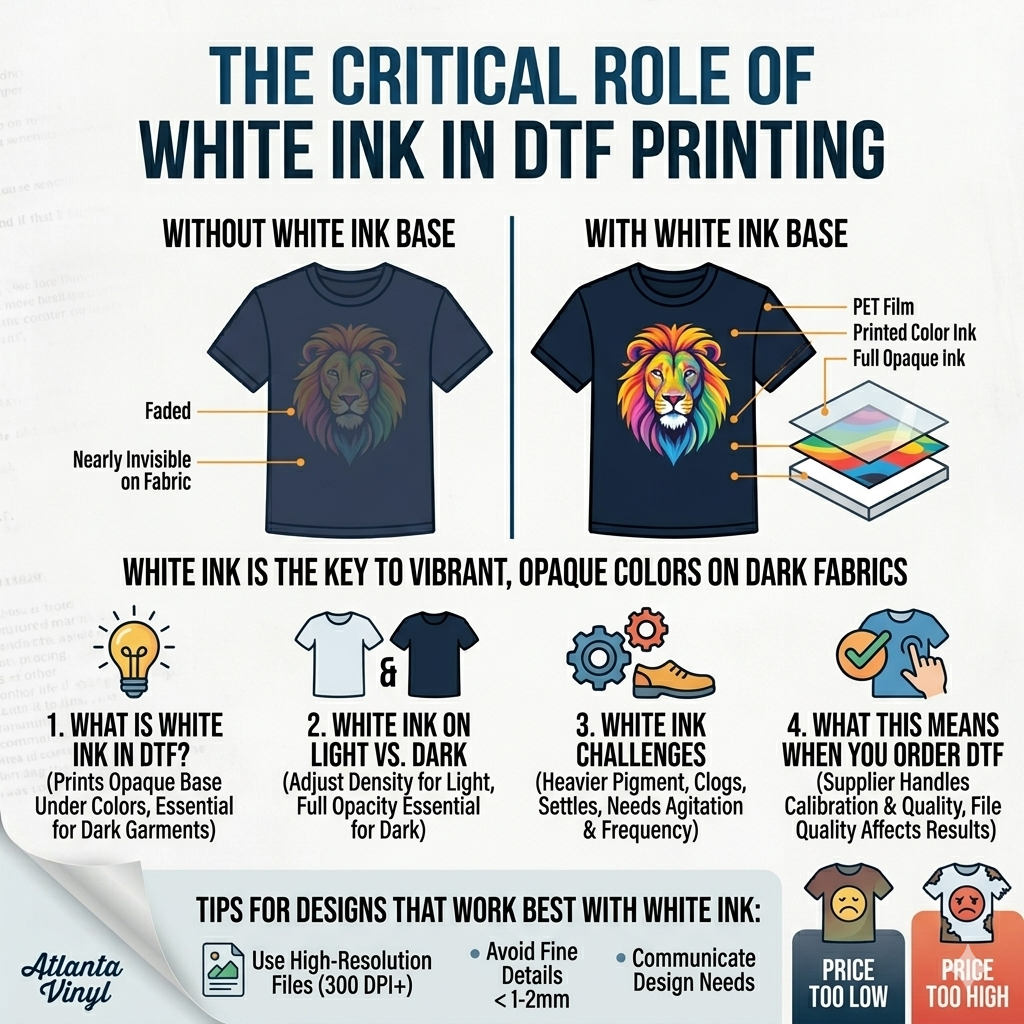
If you've ever wondered why your DTF transfers look so vibrant on dark shirts, you have white ink to thank. White ink is one of the most critical — and most misunderstood — components in direct-to-film printing. Without it, colors would simply disappear into dark fabrics, producing dull or invisible results. Understanding how white ink works will help you order better, troubleshoot problems, and get the most out of every transfer you press.
What Is White Ink in DTF?
In DTF (Direct-to-Film) printing, designs are printed onto a clear PET film using CMYK inks combined with a separate white ink layer. The white ink is typically printed as a base underneath the colors to make them pop on dark fabrics. Unlike sublimation, DTF uses white ink to create an opaque base that allows full-color designs to show clearly on any fabric color — including black, navy, red, and other dark tones.
Why White Ink Matters So Much
White ink in DTF serves two essential functions. First, it creates color vibrancy on dark substrates. Without a white base, your CMYK colors would be semi-transparent and would blend with the fabric beneath them, resulting in muted or inaccurate colors. Second, a well-printed white layer creates sharp edges and clean detail. Under-printing or improper white ink settings will result in faded colors, blurry edges, or patchy prints.
White Ink on Light vs. Dark Fabrics
For light-colored fabrics (white, light gray, cream), white ink is still printed but at a reduced opacity. Many DTF RIP software programs allow you to dial in white ink density based on the garment color. For dark fabrics (black, navy, deep red, forest green), a full, opaque white layer is essential. Without it, the design won't be visible at all. (Our full guide to DTF transfers on dark fabrics covers this in more detail.)
White Ink Challenges in DTF Printing
White ink is the most technically demanding ink in a DTF printer. It has a heavier pigment load than other inks, which means it can settle in lines and clog print heads if the printer sits idle. Regular agitation and frequent printing cycles are necessary to prevent issues. White ink also typically costs more than standard CMYK DTF inks due to its specialized titanium dioxide pigments. Too little white ink and colors look washed out. Too much and the transfer feels stiff or thick after pressing.
What This Means When You Order DTF Transfers
When you order custom DTF transfers from a supplier like Atlanta Vinyl, the white ink layer is handled for you — so you never have to worry about clogged heads or white ink calibration. Our process ensures every transfer has a properly calibrated white base for vibrant, wash-resistant results on any fabric color. What you should keep in mind is that design file quality directly affects how well the white layer is generated. High-resolution files with clean edges produce sharper results.
Tips for Designs That Work Best with White Ink
- Use high-resolution files (300 DPI or higher) with clean, defined edges.
- Avoid very fine details smaller than 1–2mm — these can be lost in the white ink layer.
- For designs with a transparent look, communicate that to your supplier, as white ink settings may need to be adjusted.
- If your design is intended for white shirts only, mention it — your supplier may be able to reduce white ink and lower costs.
White ink is the unsung hero of DTF printing. It's what makes bright, bold, full-color designs possible on any garment. Whether you're ordering transfers or eventually investing in your own DTF printer, understanding white ink helps you make smarter decisions. Atlanta Vinyl's transfers come fully prepared with professional white ink layers so your designs always look their best right off the press.